

Roles
Each workspace has exactly one owner: the person it was created for. Ownership can’t be transferred, and the owner can’t be removed.
Invite someone
Owners can invite admins and members. Admins can invite members.
1
Open members
Select Settings in the sidebar and find Members.
2
Enter an email
Type the person’s email address in Invite by email and choose a role.
3
Send
Select Send invite. The person appears in the list with an Invited badge.
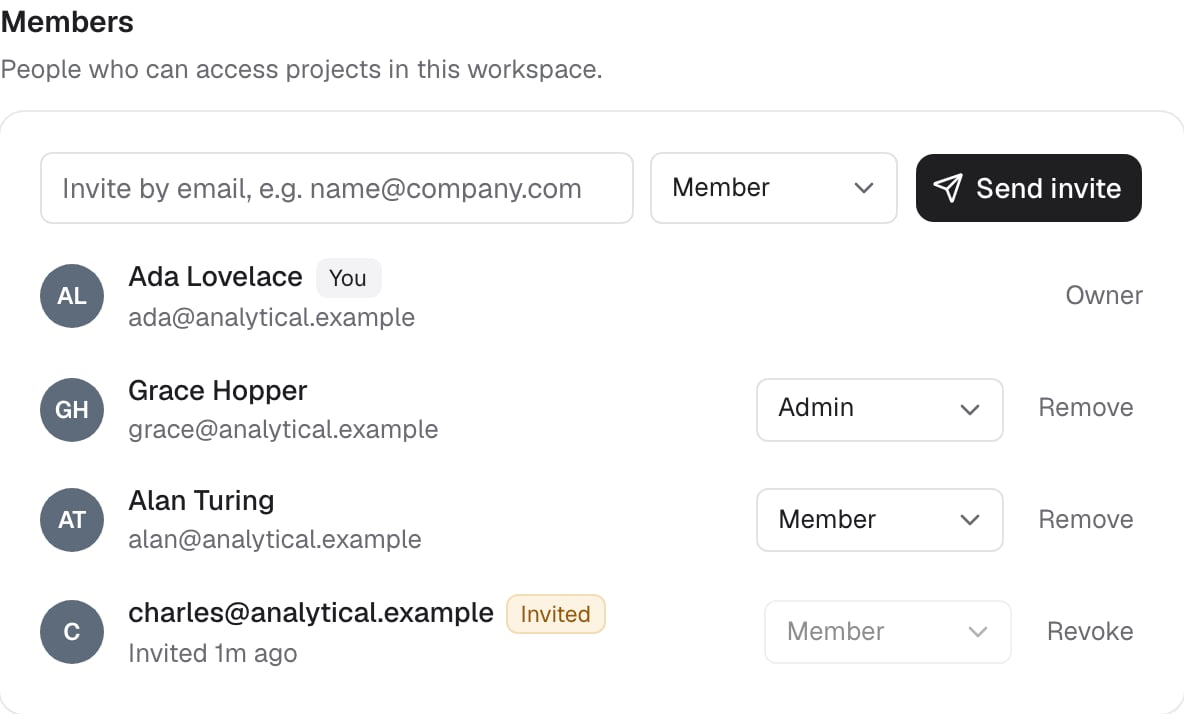
Members, their roles, and a pending invitation.
Invitations are matched by email address. Invite the address of the Google account the person signs in with.
Revoke an invitation
Owners and admins can revoke a pending invitation. Select Revoke next to it, then Confirm revoke?.Change a role
Only the owner can change roles. Choose Admin or Member from the role menu next to a person. You can’t change your own role or the owner’s role. Promoting someone to admin gives them write access to every project in the workspace. Demoting an admin to member removes that implicit access. They keep only projects shared with them directly and projects they created.Remove a member
Owners and admins can remove anyone except the owner and themselves. Select Remove next to the person, then Confirm remove?. Removing someone:- Removes their access to every project in the workspace, including projects they created
- Deletes their project access grants in that workspace
- Leaves their data in place: tables and rows they created stay in the projects