> ## Documentation Index
> Fetch the complete documentation index at: https://docs.auxilian.ai/llms.txt
> Use this file to discover all available pages before exploring further.
# Tables and columns
> Create tables, add and drop columns, link tables with foreign keys, and drop tables in the web app.
You need write access to the project to change its tables. Readers can view the schema but not change it.
## Create a table
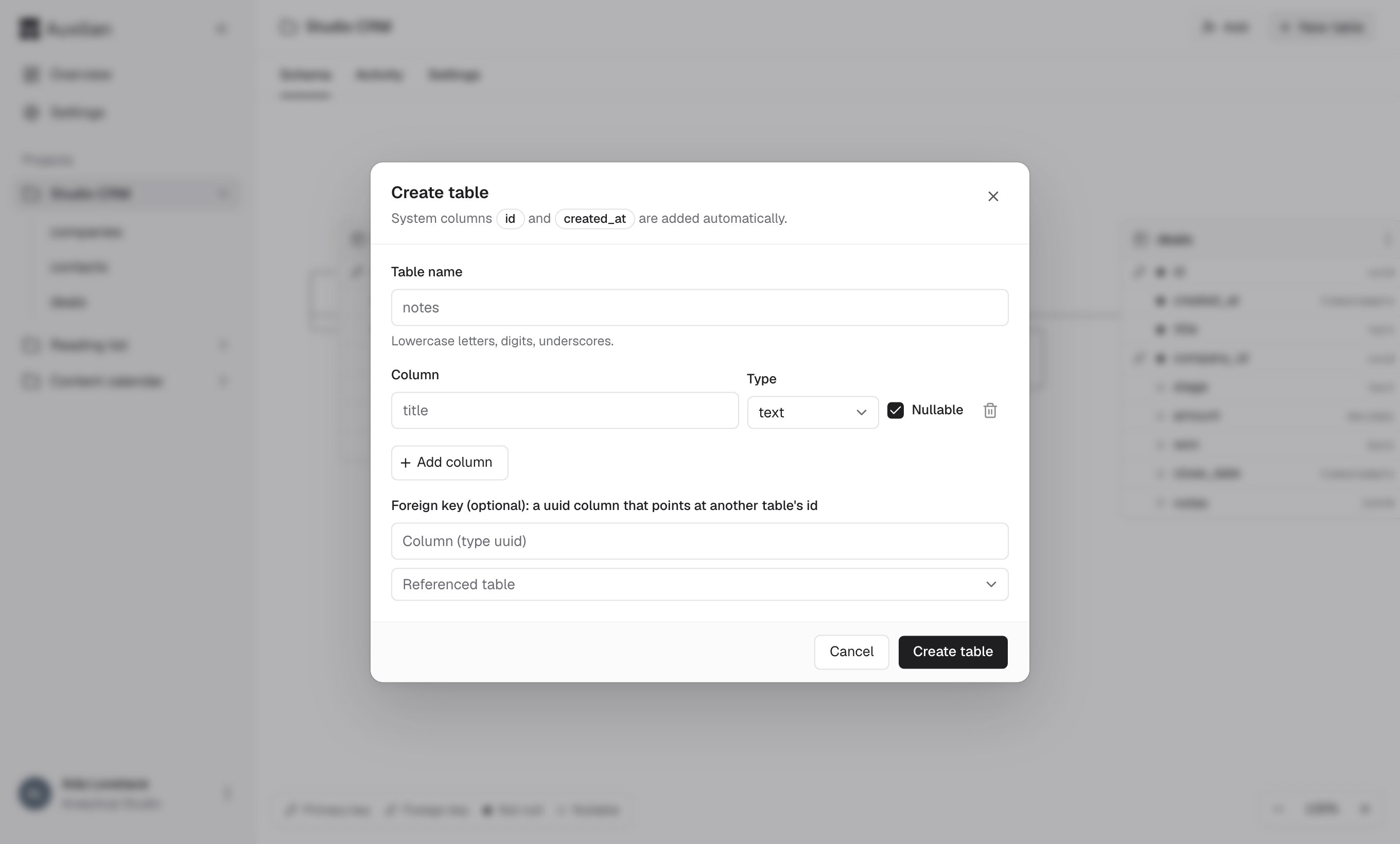
Open the project and select **New table** in the header.
Enter a table name such as `notes`. Names use lowercase letters, digits, and underscores, start with a letter or underscore, and are at most 63 characters. See [Naming rules](/reference/naming-rules).
For each column, enter a name, pick a type, and choose whether it is **Nullable** (checked by default). Select **Add column** for more rows, or the trash icon to remove one. A table needs at least one column of its own.
You don't add `id` or `created_at`. Every table gets them automatically.
Under **Foreign key (optional)**, enter the name of one of your `uuid` columns and choose the table it points at. The column then only accepts the `id` of an existing row in that table.
Select **Create table**. The table appears in the sidebar and on the **Schema** tab.
 ### Column types
| Type | Holds | Example value |
| - | - | - |
| `text` | Any string | `Piranesi` |
| `integer` | Whole numbers from -2,147,483,648 to 2,147,483,647 | `42` |
| `numeric` | Exact decimal numbers | `1499.99` |
| `boolean` | `true` or `false` | `true` |
| `timestamptz` | A date and time with time zone | `2026-11-03T09:00:00Z` |
| `uuid` | A UUID, often a reference to another row | `0b7c1f7e-6f0e-4d3a-9a51-2f7c3d1b8e44` |
| `jsonb` | Any JSON value | `{"tags": ["fiction"]}` |
See [Data types](/reference/data-types) for input and output formats.
### Limits
* Up to 25 tables per project
* Up to 50 columns per table, not counting `id` and `created_at`
## Add a column
Select the table in the sidebar.
Select **Add column**, enter a name, choose a type, and set **Nullable**. Then select **Add column** in the dialog.
Existing rows get `NULL` in a new nullable column. A column that is not nullable can only be added to an empty table, because existing rows would have no value for it.
Foreign keys can only be defined when a table is created. To link an existing table, ask Claude to create a new table with the foreign key and move the data, or recreate the table.
## Drop a column
Open the table and select **Manage**.
Under **Drop a column**, choose the column, select **Drop**, then select **Confirm drop**.
Dropping a column deletes its data from every row. You can't drop `id` or `created_at`, and a table must keep at least one column of its own. To remove the last one, drop the table. If the column has a foreign key, the foreign key is removed with it.
## Drop a table
Open the table and select **Manage**.
Under **Drop this table**, type the table name exactly.
Select **Drop table**. You return to the project's schema.
You can't drop a table while another table has a foreign key that points at it. Drop that column or table first. The error names it, for example: `Table "companies" is referenced by "contacts"."company_id"; drop that column or table first`.
Dropping a column or table cannot be undone. Export the table first if you might need the data. See [Export to CSV](/app/export).
## Rename or change a column
Auxilian doesn't rename tables or columns, or change a column's type, in place. To change one, add a new column, copy the values (Claude can do this with `list_rows` and `update_rows`), then drop the old column.
This documentation is built and hosted on [Mintlify](https://mintlify.com), a developer documentation platform.
### Column types
| Type | Holds | Example value |
| - | - | - |
| `text` | Any string | `Piranesi` |
| `integer` | Whole numbers from -2,147,483,648 to 2,147,483,647 | `42` |
| `numeric` | Exact decimal numbers | `1499.99` |
| `boolean` | `true` or `false` | `true` |
| `timestamptz` | A date and time with time zone | `2026-11-03T09:00:00Z` |
| `uuid` | A UUID, often a reference to another row | `0b7c1f7e-6f0e-4d3a-9a51-2f7c3d1b8e44` |
| `jsonb` | Any JSON value | `{"tags": ["fiction"]}` |
See [Data types](/reference/data-types) for input and output formats.
### Limits
* Up to 25 tables per project
* Up to 50 columns per table, not counting `id` and `created_at`
## Add a column
Select the table in the sidebar.
Select **Add column**, enter a name, choose a type, and set **Nullable**. Then select **Add column** in the dialog.
Existing rows get `NULL` in a new nullable column. A column that is not nullable can only be added to an empty table, because existing rows would have no value for it.
Foreign keys can only be defined when a table is created. To link an existing table, ask Claude to create a new table with the foreign key and move the data, or recreate the table.
## Drop a column
Open the table and select **Manage**.
Under **Drop a column**, choose the column, select **Drop**, then select **Confirm drop**.
Dropping a column deletes its data from every row. You can't drop `id` or `created_at`, and a table must keep at least one column of its own. To remove the last one, drop the table. If the column has a foreign key, the foreign key is removed with it.
## Drop a table
Open the table and select **Manage**.
Under **Drop this table**, type the table name exactly.
Select **Drop table**. You return to the project's schema.
You can't drop a table while another table has a foreign key that points at it. Drop that column or table first. The error names it, for example: `Table "companies" is referenced by "contacts"."company_id"; drop that column or table first`.
Dropping a column or table cannot be undone. Export the table first if you might need the data. See [Export to CSV](/app/export).
## Rename or change a column
Auxilian doesn't rename tables or columns, or change a column's type, in place. To change one, add a new column, copy the values (Claude can do this with `list_rows` and `update_rows`), then drop the old column.
This documentation is built and hosted on [Mintlify](https://mintlify.com), a developer documentation platform.