> ## Documentation Index
> Fetch the complete documentation index at: https://docs.auxilian.ai/llms.txt
> Use this file to discover all available pages before exploring further.
# Projects
> Create, open, and delete projects in the Auxilian web app.
A project is a database: an isolated Postgres schema that holds your tables. Every project belongs to one workspace.
## The overview page
The **Overview** page lists every project you can open, across all of your workspaces, with its description and tables. The sidebar shows the same projects; expand one to jump to its tables.
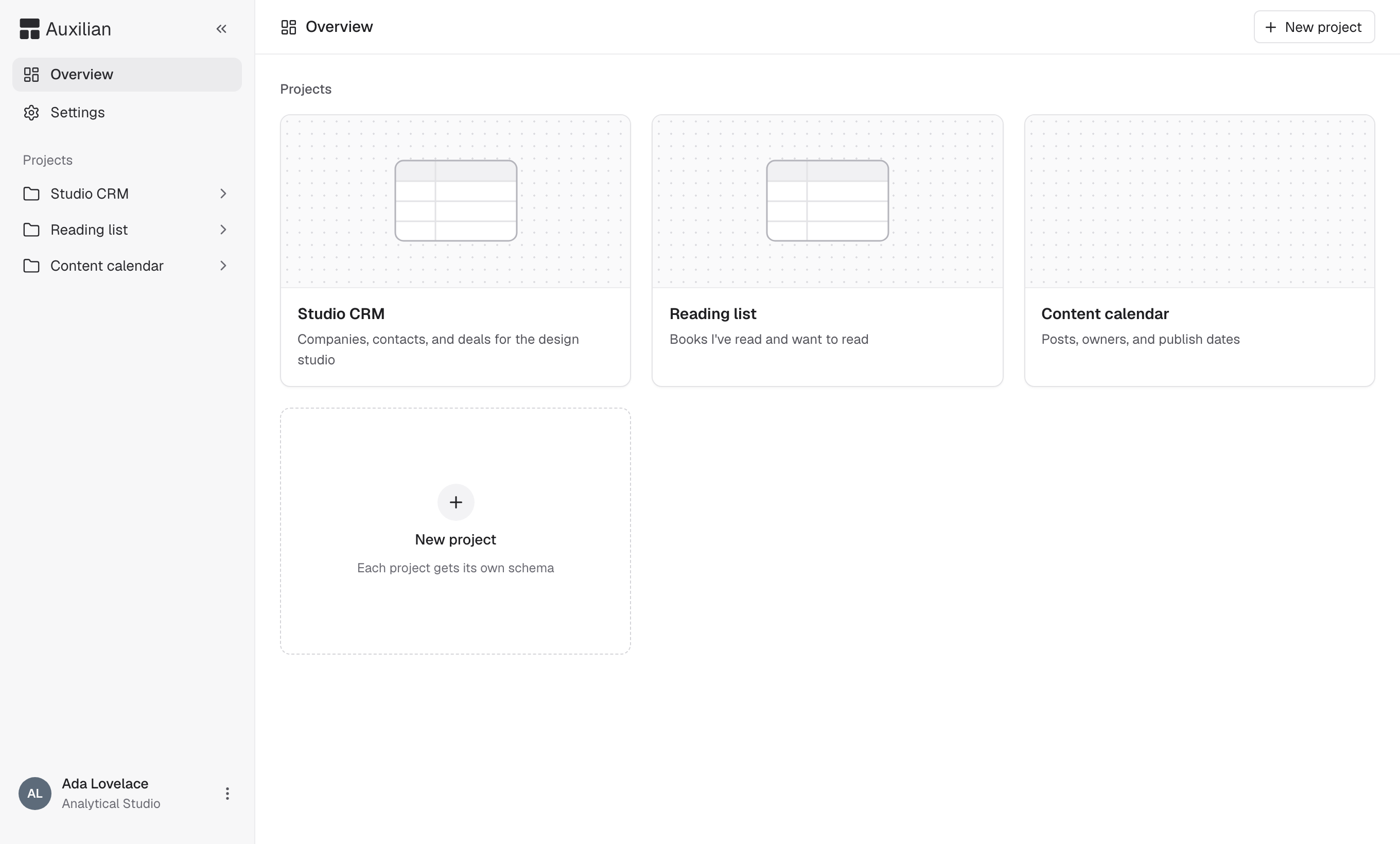 If you don't have any projects yet, the overview shows a **Welcome to Auxilian** card with the MCP server URL and the steps to connect Claude.
## Create a project
Only the owner and admins of the active workspace can create projects. Members don't see the **New project** button. Ask an owner or admin to create a project and share it with you.
On the **Overview** page, select **New project** in the header or the **New project** tile.
Enter a name of 1 to 80 characters and an optional description of up to 200 characters. Extra spaces are collapsed.
Select **Create project**. The project opens with no tables.
The project is created in the **active workspace**. To create it somewhere else, switch workspaces first. See [Workspaces](/collaborate/workspaces).
A workspace can hold up to 10 projects. When it is full, delete a project you no longer need.
## Inside a project
A project page has up to three tabs:
| Tab | Shows | Who sees it |
| - | - | - |
| **Schema** | A diagram of every table, its columns, and the foreign keys between tables | Everyone with access |
| **Activity** | The project's activity log | Everyone with access |
| **Settings** | Project deletion | The project creator and workspace owners and admins |
People with write access also see **Add** (for sharing) and **New table** in the header.
If you don't have any projects yet, the overview shows a **Welcome to Auxilian** card with the MCP server URL and the steps to connect Claude.
## Create a project
Only the owner and admins of the active workspace can create projects. Members don't see the **New project** button. Ask an owner or admin to create a project and share it with you.
On the **Overview** page, select **New project** in the header or the **New project** tile.
Enter a name of 1 to 80 characters and an optional description of up to 200 characters. Extra spaces are collapsed.
Select **Create project**. The project opens with no tables.
The project is created in the **active workspace**. To create it somewhere else, switch workspaces first. See [Workspaces](/collaborate/workspaces).
A workspace can hold up to 10 projects. When it is full, delete a project you no longer need.
## Inside a project
A project page has up to three tabs:
| Tab | Shows | Who sees it |
| - | - | - |
| **Schema** | A diagram of every table, its columns, and the foreign keys between tables | Everyone with access |
| **Activity** | The project's activity log | Everyone with access |
| **Settings** | Project deletion | The project creator and workspace owners and admins |
People with write access also see **Add** (for sharing) and **New table** in the header.
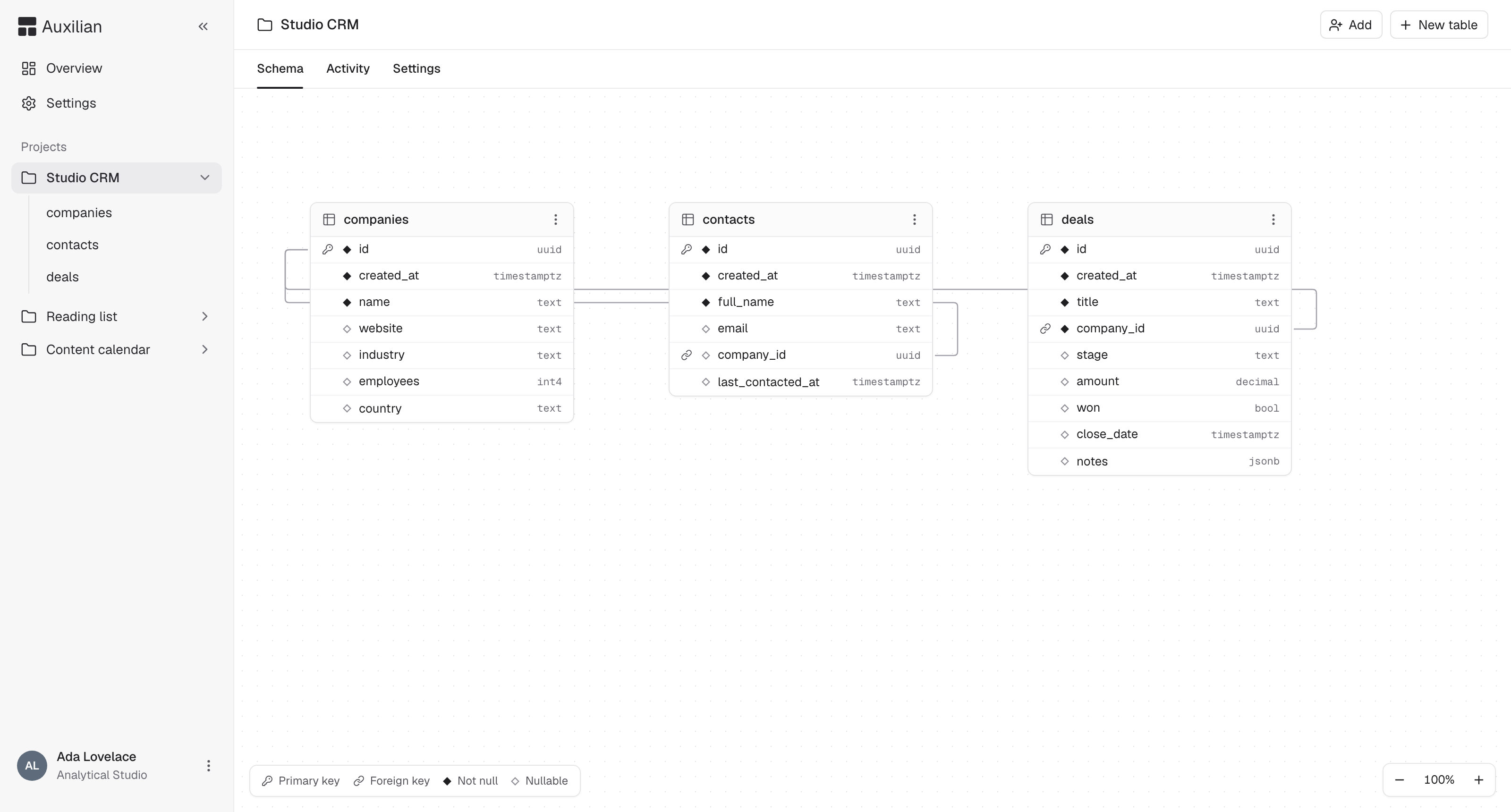 On the **Schema** tab, a filled diamond next to a column means `NOT NULL`, and a hollow diamond means nullable. Lines between tables are foreign keys. You can drag tables to rearrange the diagram. The diagram labels some types with their Postgres short names: `int4` for `integer`, `decimal` for `numeric`, and `bool` for `boolean`.
## Delete a project
Deleting a project permanently removes its database, every table and row in it, everyone's access to it, and its activity log.
Deletion cannot be undone. Export any tables you want to keep first. See [Export to CSV](/app/export).
Open the project and select the **Settings** tab. Only the creator and workspace owners and admins see this tab.
Under **Delete project**, type the project name exactly as shown.
Select **Delete project**. You return to the overview.
AI assistants cannot delete projects. This action is only available in the web app.
This documentation is built and hosted on [Mintlify](https://mintlify.com), a developer documentation platform.
On the **Schema** tab, a filled diamond next to a column means `NOT NULL`, and a hollow diamond means nullable. Lines between tables are foreign keys. You can drag tables to rearrange the diagram. The diagram labels some types with their Postgres short names: `int4` for `integer`, `decimal` for `numeric`, and `bool` for `boolean`.
## Delete a project
Deleting a project permanently removes its database, every table and row in it, everyone's access to it, and its activity log.
Deletion cannot be undone. Export any tables you want to keep first. See [Export to CSV](/app/export).
Open the project and select the **Settings** tab. Only the creator and workspace owners and admins see this tab.
Under **Delete project**, type the project name exactly as shown.
Select **Delete project**. You return to the overview.
AI assistants cannot delete projects. This action is only available in the web app.
This documentation is built and hosted on [Mintlify](https://mintlify.com), a developer documentation platform.